How to Choose a Right CAD Software and a Right Domain?
In today's dynamic world of design and engineering, Computer-Aided Design (CAD) software has become an indispensable tool. CAD software empowers engineers, architects, and designers to create, simulate, and visualize their ideas in a virtual environment.
We are talking here about CAD software, that is, about CATIA, UGNX, CREO, SolidWorks, AutoCAD, etc. We see the scenario that, lots of mechanical candidates are getting passed out every year with a dream of becoming a design engineer in a reputed organization. And for that, they go and join a training center, and start learning a number of CAD software with the hope that, by learning several software, they will get several job opportunities.
But is this the right way to become a design engineer, or get a job as a design engineer in a reputed organization? The answer is, No. Because it is the biggest myth.
2023-09-01

Biggest Myth: Learning a number of CAD software will only help them to get a job or to get more job opportunities. This is not the right successful way to become a design engineer. Why? Because lots of mechanical candidates have already learned a number of software, and not having a job in the field of design field. So why is it? Why did this happen? There is a valid reason with valid proof. Let’s move toward the truth.
Truth is: Learning a number of CAD software will not help you to get the job. Only a specialization will help you to get the job. For Specialization, you should go for maximum 2 CAD software to learn in depth with Domain Knowledge. However, a common question that often arises is: "How many CAD software should we learn?" The answer to this question depends on various factors, including your field of expertise, industry requirements, and personal career goals. Let's explore a few considerations that can help you navigate the decision of how many CAD software programs to learn.
Diversify Skills vs. Specialization: One approach is to become proficient in multiple CAD software to diversify your skill set. This can be particularly valuable in industries where different software are preferred for different aspects of design. For instance, if you're in the automotive field, you might want to be familiar with both CATIA and Unigraphics, as they are required in the automotive product design domain. On the other hand, specializing in one software, either CATIA or Unigraphics, can make you an expert in that specific tool, potentially making you more competitive in roles that specifically require that software.
Industry Demands: Research the industries you're interested in and find out which CAD software are commonly used. Some industries have clear leaders in terms of software, and knowing these tools can be crucial for landing a job or advancing in your career. For instance, SolidWorks is often used in mechanical and product design, while CATIA is preferred in aerospace and automotive sectors.
Adaptability: CAD software skills are transferrable to a certain extent. If you become proficient in one software, transitioning to another can be easier since the fundamental principles of design and modeling remain the same. Learning how to use one CAD software in-depth can thus make it easier to learn new ones in the future.
Learning Curve: Different CAD software have varying learning curves. Some might be relatively straightforward to pick up if you're familiar with similar tools, while others might require more time and effort. Assess your capacity to learn and adapt when deciding how many software to take on simultaneously.
Personal Preference: Your personal interest and comfort with a particular software also play a role. If you genuinely enjoy working with a specific CAD tool, you're more likely to invest the time and effort needed to master it.
We, at ISOPARA, always recommend to every candidate who wants to become a design engineer is, to go for one software learning only, with one domain knowledge. Domain Knowledge are like, Plastic Product Design, BIW Product Design, Press Tool Design, Mol

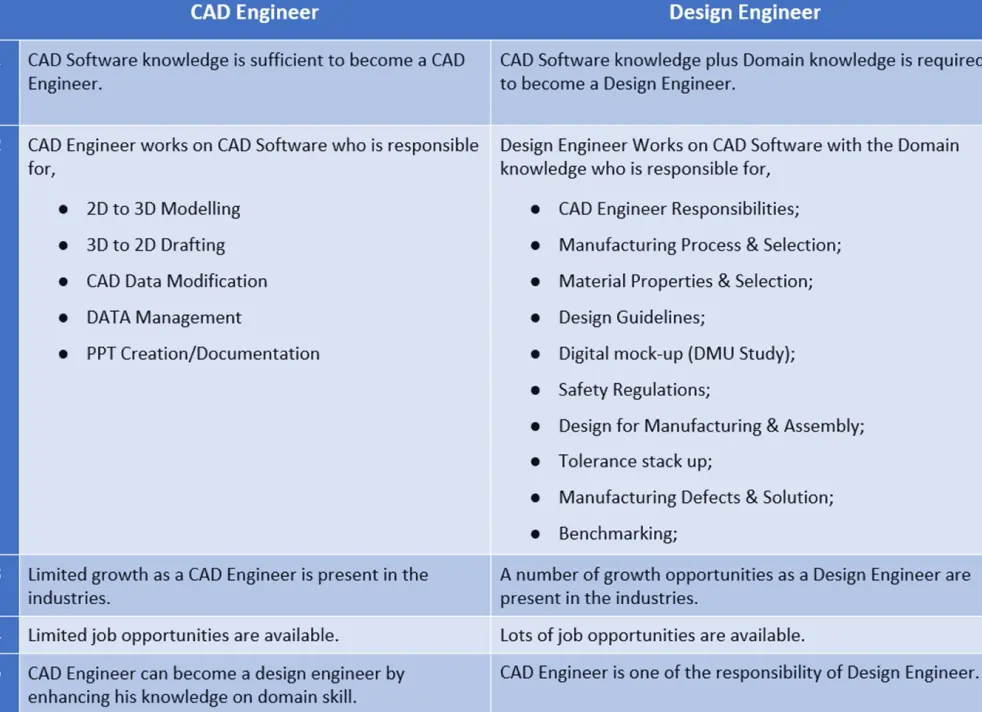
With this difference between a CAD engineer and a design engineer, we can understand what the essentials are required to become a design engineer. We have seen the biggest myth and truth for choosing a right CAD software. Also, we have explored a few considerations that can help you navigate the decision of how many CAD software. Now, let's move toward our next point is that, which software should we learn? What are the steps?
There are 3-Steps to Choose the Right Software and these steps mentioned below!
Step-1: Choose the Dream Industry to Work in. So first decide what is your dream industry or the type of industry you want to work in, such as, Automotive, Aerospace or Aviation, Manufacturing, Automation, Defense, Marine, etc.
Step-2: Choose the Domain you want to Work on. So now choose which domain you want to work on and want to make your career. Choose a domain you are interested in, such as Plastic Product Design, BIW Product Design, Press Tool Design, Mold Design, Fixture design, etc.
Step-3: Software used in that Domain by that Industry. Here you have to understand which software is being used by your selected industry type in your chosen domain, such as CATIA, UGNX, SolidWorks, AutoCAD, Fusion 360, Solid Edge, etc. Hence, these three steps help you in choosing the right CAD Software to Learn.
If you follow these steps, you will get to know which software you have to choose and start to build your career. Now, to understand it in proper way, let’s take an example.
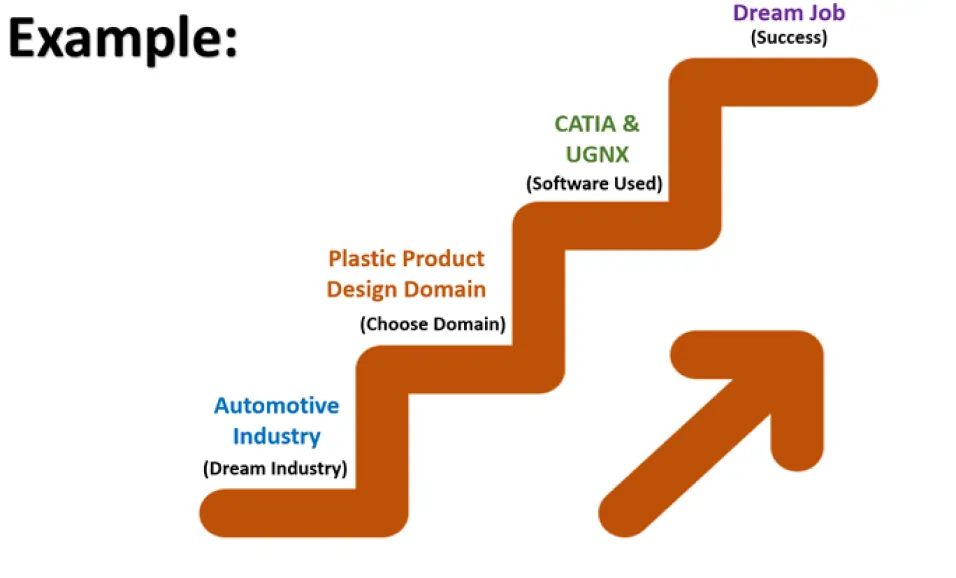
Select your dream industry, that is, step one. Let’s consider your dream industry is the Automotive Industry. Now, choose a domain, that is, step two. Let’s consider this as you want to make a career in the plastic product design domain. Now, the last is, the software used, that is, CATIA and UGNX. Hence, you found that which software is used in that domain in that industry type. Hence choose only one software and start your learning with the domain knowledge.
This is how you can choose a right CAD software and a right domain.
Author

Naresh Kumar ( Sr. Design Engineer)
Total 4 Blogs viewSr. Design Engineer with 6+ years of experience with plastic trims-Exteriors and Interiors. Working with some big names in the industry, like OEMs and Tier-1 suppliers.
Author’s journey so far:
My journey started after finishing my BTech degree, and I felt lost. People around me suggested that to try competitive exams like GATE, PSUs, and IES. So, I gave it my all for two years, but it didn't feel right for me. I then shifted my focus to government exams, like the Bank PO exam, hoping for a better fit. But even that didn't work out as planned. At this point, I realized that I wanted to do something related to mechanical engineering, my field of study. I discovered the design engineer role, which sounded interesting and had a promising future. I began wondering how I could break into this field. That's when I stumbled upon isopara.com, a place that seemed to hold the key to my future. I read blogs and reviews about Isopara, and I was impressed. So, I decided to take a chance and called their office. Our discussion opened up new possibilities that changed the direction of my life. So, I packed my bags and left my hometown for Pune. I got a joined course at ISOPARA the very next day, in Plastic trims. At first, I didn't know what I was doing, but I followed their instructions to the letter. Every day was a new challenge, but I kept at it, doing assignments and exercises. I was learning the ins and outs of design, from the basics to the advanced stuff, using CATIA. Fast forward six years, and here I am, working with some big names in the industry, like OEMs and Tier-1 suppliers. It's been quite a journey from that phone call to where I am today.
Course done and recommended by Author:
Share This Page



Other Trending Videos
- 3-Steps || Choose the Right CAD Software with the Right Domain
- Roadmap || Become an Automotive Design Engineer in BIW Domain.
- Roadmap || Become an Automotive Design Engineer in Plastic Domain
- Not Getting Interview CALLS? || Career Guidance
- Mechanical Design Jobs || Domain Skill
- Why CAD and its Importance? || By Experts
- Difference || CAD Engineer Vs Design Engineer
- Best CAD Software to Learn & Build a Career || By Experts
- Best CAD Software to Learn || Most Demanded by Industries
- How to Become a Design Engineer? || By Expert.